Introducing Professional Headshots with AI
TailorMe Pro now includes AI-generated professional headshots, so you can turn a clear everyday photo into a polished profile portrait.
Tailor your resume before you apply.
Upload your Master Resume, paste a job posting, and review a role-specific resume in minutes.
Start tailoring for free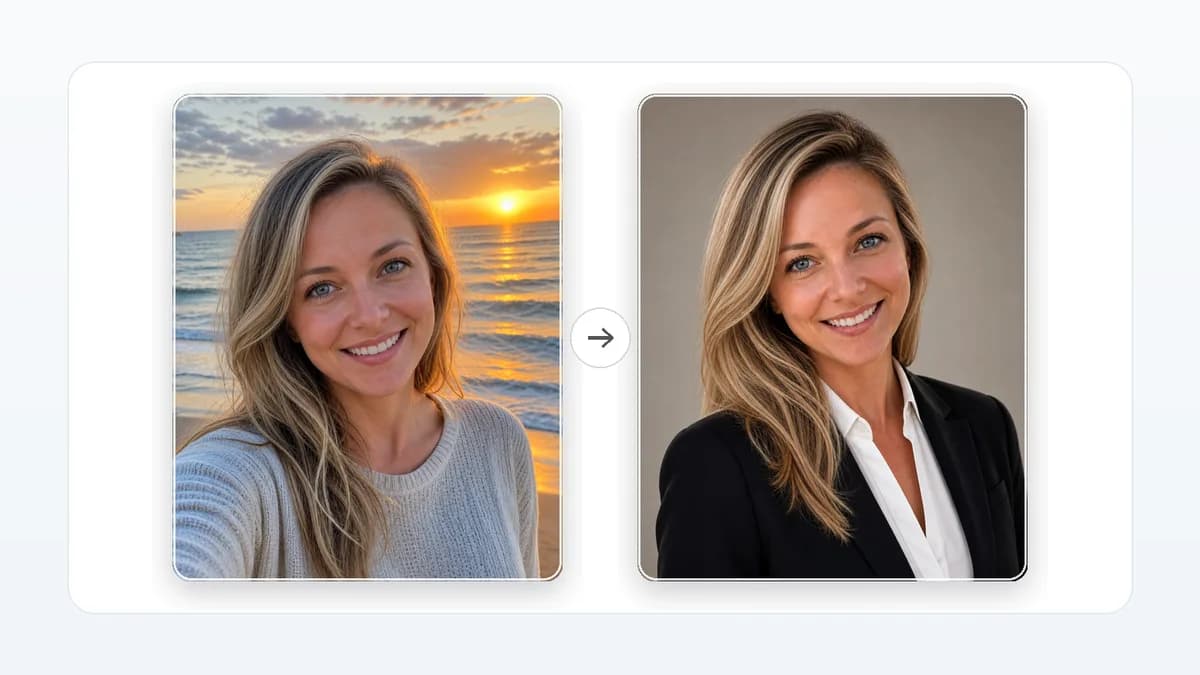
Your resume is often the first proof a recruiter sees. Your profile photo is often the second, especially when a hiring manager checks LinkedIn, your email avatar, or your portfolio before an interview.
That is why TailorMe Pro now includes Professional Headshots with AI: a fast way to turn a clear personal photo into polished profile photos for LinkedIn, email, and portfolios.
From casual photo to professional portrait
A traditional studio shoot can easily cost $500. With the snap of your camera, TailorMe Pro gives you professional headshots for $20/month, not just one image, but several options across different outfits and settings.
Upload a well-lit photo where your face is visible, and TailorMe generates multiple professional portrait styles you can review, download, copy, or refine.
The demo below uses a fully AI-generated synthetic person, not a real customer or model.


What Pro users can do
Professional Headshots with AI are included with TailorMe Pro. Once you are on Pro, you can:
- Generate a professional, smart casual, and casual portrait set from one upload.
- Refine a generated portrait with short instructions like "softer light" or "formal jacket."
- Copy or download finished portraits for LinkedIn, email, and portfolio profiles.
- Keep everything in the same workspace where you tailor resumes and track applications.
Why a professional headshot matters in a job search
A headshot will not replace strong experience, but it can reduce friction. Recruiters and hiring managers often move between your resume, LinkedIn profile, portfolio, email thread, and calendar invite. A clear, current photo helps them connect those touchpoints and recognize the same candidate across the process.
That matters most when your application has already earned interest. Someone may open your LinkedIn profile after reading your resume. They may check your portfolio before deciding whether to schedule a screen. They may look at your email avatar while coordinating interview times. In each moment, your profile photo is a small trust signal.
The goal is not to look artificial or overly polished. The goal is to look like a real professional version of yourself: clear face, neutral background, appropriate lighting, and styling that fits the roles you want.
Where to use the finished headshot
Use the strongest portrait anywhere an employer may see you during the hiring process:
- LinkedIn profile photo
- Portfolio or personal website
- Email account avatar
- GitHub, Behance, Dribbble, or industry profile pages
- Conference speaker bios or community pages
- Recruiter-facing directories and talent marketplaces
Consistency helps. If the same person appears across your resume links, email, and professional profiles, the hiring team has one less thing to reconcile. You do not need every account to look identical, but the overall impression should be current and intentional.
How to choose the right style
Pick the headshot style based on the role and industry, not just the image you personally like most.
For corporate, finance, consulting, operations, legal, and executive roles, choose a clean professional portrait with simple clothing, direct eye contact, and restrained background detail. For product, design, marketing, and startup roles, a smart casual portrait can feel more natural while still looking polished. For creative portfolios, a warmer or more expressive image may be useful, as long as your face remains clear.
Avoid images that look too stylized for the context. Heavy filters, dramatic lighting, unrealistic skin texture, or a background that distracts from your face can work against you. A good job-search headshot should feel credible before it feels impressive.
What makes a good source photo
For the best results, choose a photo where your face is centered and clearly visible. Avoid sunglasses, hats, heavy shadows, thick glasses, cropped faces, and group shots. The AI can improve the setting and presentation, but it still needs a clear view of you.
AI-generated headshots can contain visual inaccuracies, so review the final portrait before using it publicly.
Use this quick source-photo checklist before uploading:
- Face visible and in focus
- Camera at or slightly above eye level
- Even lighting without heavy shadows
- No other people in the frame
- Hair, glasses, and facial features unobstructed
- Enough image resolution to crop cleanly
- Expression that looks natural, not forced
If you have several possible source photos, choose the one with the clearest face rather than the most interesting background. The background can change. The source likeness matters more.
How to review an AI-generated headshot
Do not use the first result blindly. Review the image the same way you would review a tailored resume: check whether it is accurate, useful, and appropriate for the audience.
Look closely at facial features, hairline, teeth, glasses, earrings, hands, collars, and jacket edges. Small visual artifacts can be easy to miss when the image looks good overall. If something feels off, generate another option or refine the prompt.
Then ask whether the image matches your professional context. A profile photo for a senior finance role should not feel like a fashion shoot. A photo for a creative portfolio can have more personality, but it should still be recognizable and clear. The best headshot helps people remember you without making the photo itself the story.
A headshot works best with a complete profile
Your photo is one part of the application surface. It works best when the rest of the profile is consistent:
- LinkedIn headline matches the type of role you are pursuing
- About section supports the same story as your resume
- Featured links or portfolio items are current
- Experience bullets use the same language as your target roles
- Contact information is accurate
- Resume and profile do not contradict each other
This is why TailorMe keeps headshots near resume tailoring instead of treating them as a separate vanity feature. A polished portrait is useful when it supports a coherent application package. It is much less useful if the resume, LinkedIn headline, and portfolio are all telling different stories.
Responsible use of AI headshots
AI headshots should still represent you honestly. Do not choose a result that changes your age, face shape, body type, or identity in a way that would surprise someone meeting you on a video call. Do not use a portrait that makes you look like a different person.
The best use is presentation cleanup: better lighting, cleaner background, sharper crop, and more professional clothing. That helps you avoid the cost and logistics of a studio shoot while keeping the result grounded in your real appearance.
If you are unsure between two images, choose the more natural one. Recruiters are not looking for a magazine cover. They are looking for a person they can imagine speaking with on a screen, in a meeting, or across an interview table.
How it fits with your resume story
The best application materials point in the same direction. If your resume is tailored for product operations, your LinkedIn headline, profile photo, and featured work should support that same professional story. If your resume is aimed at senior engineering leadership, the rest of your profile should feel credible for someone who leads technical decisions, mentors teams, and communicates clearly with stakeholders.
That does not mean every channel needs to repeat the same words. It means they should not fight each other. A careful tailored resume paired with an outdated profile photo, stale headline, and unrelated portfolio can make the application feel unfinished. A clear headshot paired with a generic resume has the opposite problem: the presentation is polished, but the proof is weak.
Think of the headshot as the finishing layer after the core application is strong. Start with a Master Resume that captures your real experience. Tailor the resume to the job posting. Update the profile headline and summary so they match the kind of role you are pursuing. Then choose a headshot that feels current, professional, and appropriate for that audience.
This order keeps the work grounded. You are not using a polished image to compensate for unclear experience. You are making it easier for a recruiter to recognize and remember the same qualified person across every touchpoint.
When to refresh your headshot
Refresh your profile photo when it no longer looks like you, when your target role changes, or when the current image feels inconsistent with the level of work you are pursuing. A photo from five years ago may still be flattering, but it can create a small moment of confusion on a video call.
You do not need to update it constantly. Treat it like your resume summary: revisit it when your positioning changes. If you move from individual contributor roles into management, shift industries, or start applying to more senior positions, a cleaner and more current headshot can help the rest of your application feel aligned.
A broader job-search toolkit
TailorMe started with resume tailoring because every application needs a resume that speaks to the role. But the job search is bigger than one document: hiring teams see your resume, profile photo, portfolio, emails, application history, and follow-up.
Professional Headshots with AI is part of TailorMe expanding into a suite of tools for the full job search, helping you present a clear, consistent, professional version of yourself wherever hiring teams find you.
You can open Headshot Studio from the TailorMe dashboard. Free users can view the feature and upgrade when they are ready to generate portraits.
Ready to tailor your next application?
Upload your Master Resume, add a job posting, and get a resume built for that role in minutes.
Start tailoring for free